
Generate Frida scripts directly from IDA Pro, Binary Ninja, and Ghidra. ⚡










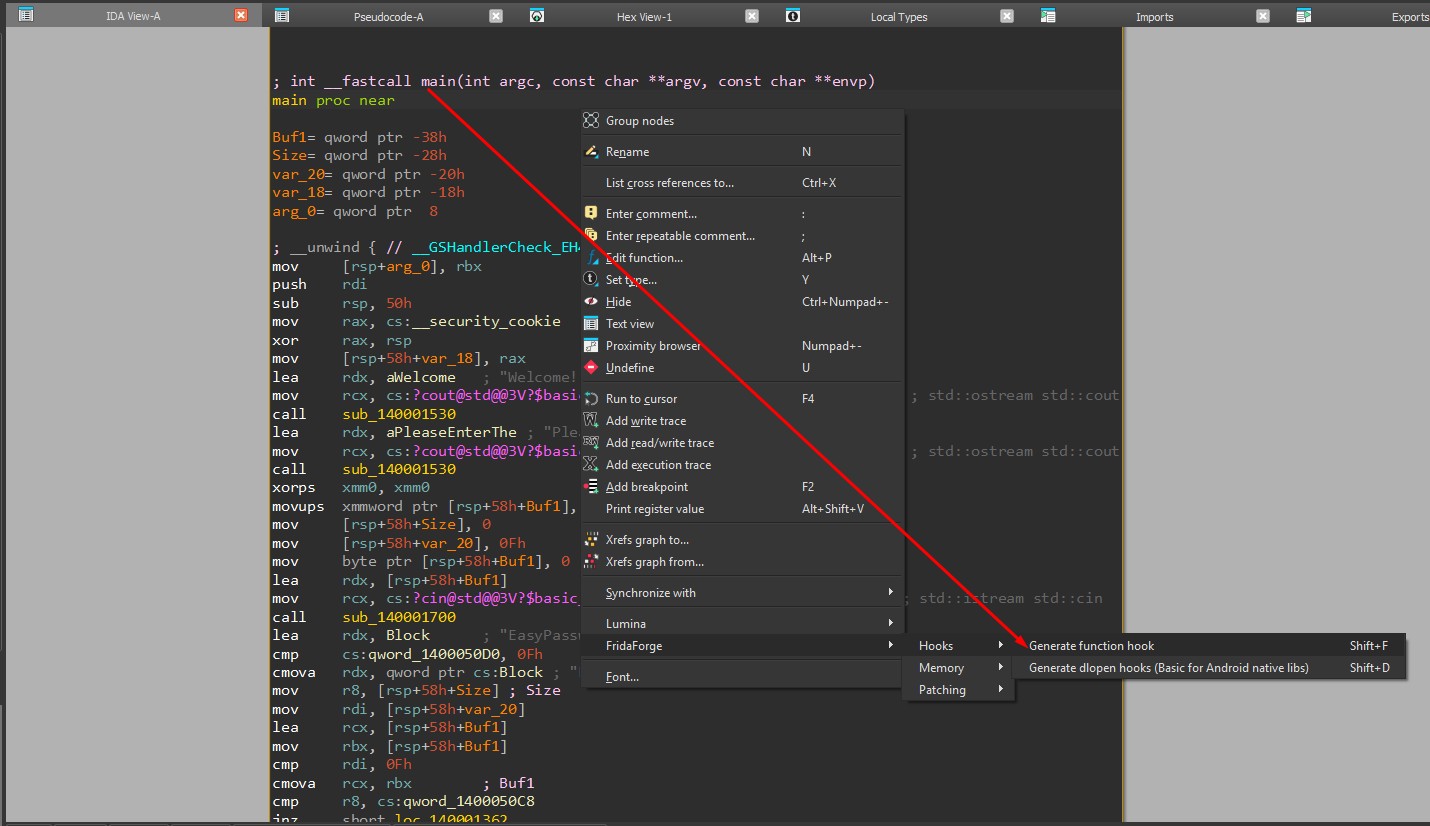
Generate a function hook — right-click in the disassembly/pseudocode view and pick an action:
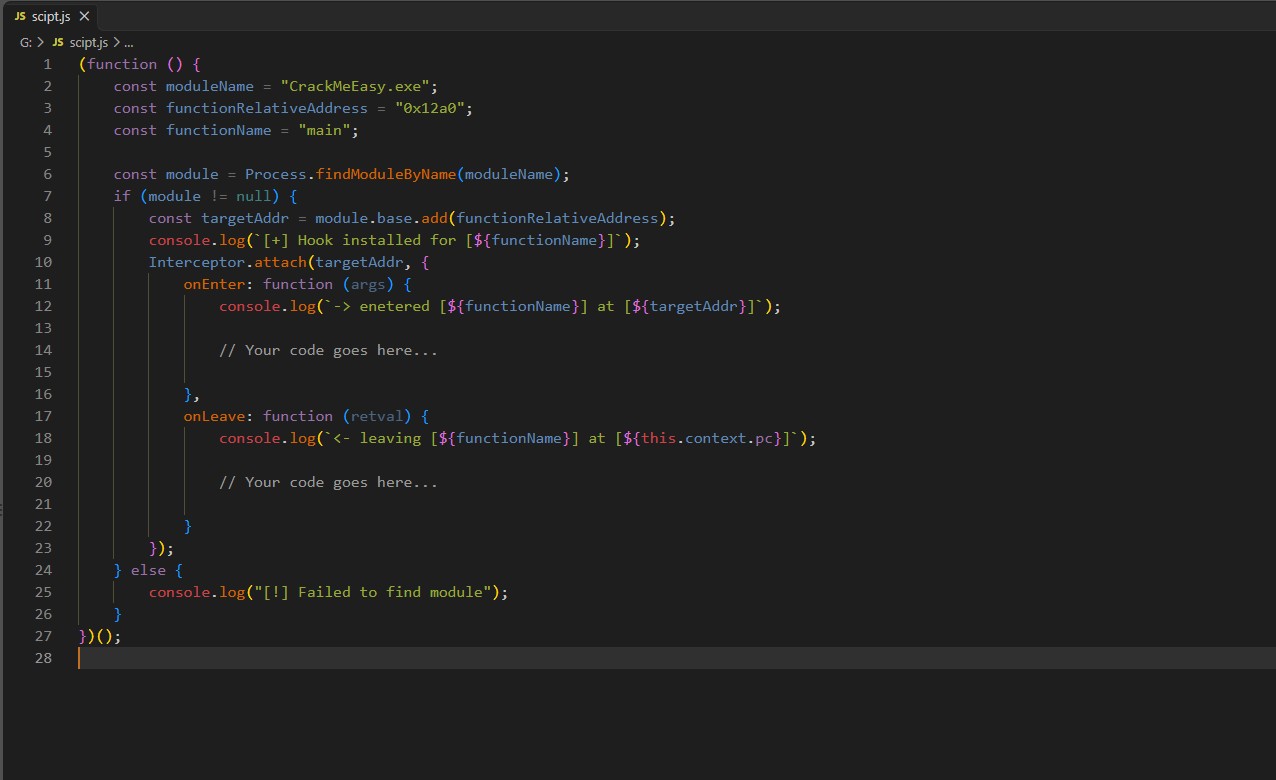
Get a ready-to-use Frida script — copied straight to your clipboard:
Right-click (or hit a hotkey) in your disassembler to generate ready-to-use Frida snippets — the result is instantly copied to your clipboard.
- 🧩 Composable scripts — snippets are independent but can be nested to build complex instrumentation with a few clicks
- 🎯 Context-aware — scripts auto-fill module name, function address, section, and any other detail available from your current context
- 🧰 Three hosts, one experience — identical features, hotkeys, and menus in IDA Pro, Binary Ninja, and Ghidra
- 📋 Clipboard integration — generated scripts are copied the moment you run an action
| Action | Description | Hotkey |
|---|---|---|
| Generate function hook | Intercept calls to the selected function, log entry/exit | Shift+F |
| Generate dlopen hooks | Monitor dlopen (including Android variants) to detect module loading |
Shift+D |
| Action | Description | Hotkey |
|---|---|---|
| Modify section protection | Change memory protection of the section at the current address | Shift+M |
| Action | Description | Hotkey |
|---|---|---|
| Negate cond branch (ARM64) | Flip the condition of an ARM64 conditional branch | Shift+A |
| Negate cond branch (x86/x64) | Flip the condition of an x86/x64 conditional branch | Shift+X |
Each feature follows a simple pipeline: a Frida template (fridaforge/templates/) provides the JavaScript skeleton with placeholders, a command (fridaforge/commands/) gathers context through a host-agnostic Backend, and a generator (fridaforge/core/) fills the template to produce the final script.
The shared core knows nothing about IDA, Binary Ninja, or Ghidra. Each host lives in hosts/ and provides a thin adapter that implements the Backend interface (data extraction, clipboard, menu + hotkey registration). Add a feature once and it works in all three.
Binary Ninja users can install straight from the Extension Manager. For everything else, grab the archive for your tool from the latest release. There's one per host — fridaforge-binja-<version>.zip, fridaforge-ida-<version>.zip, and fridaforge-ghidra-<version>.zip.
Extension Manager (recommended): open the Extension Manager (Plugins → Manage Plugins), search for FridaForge, and click Install. The shared core (fridaforge on PyPI) is installed automatically. Restart Binary Ninja if prompted.
Manual install:
- Find your user plugins directory by running this in Binary Ninja's Python console:
binaryninja.user_plugin_path()
- Extract
fridaforge-binja-<version>.zipinto that directory so that<binja user plugins>/fridaforge/exists. - Restart Binary Ninja.
Switching from a manual install to the Extension Manager? Delete
<binja user plugins>/fridaforge/first. Otherwise both copies load and every command appears twice.
- Prerequisites:
- IDA Pro (tested with 9.0, but any version with Python 3 and
idaapishould work). - PyQt5 for clipboard functionality (usually bundled with IDA's Python).
- IDA Pro (tested with 9.0, but any version with Python 3 and
- Locate your IDA Pro user directory by running this in IDA's Python console:
If not already there, create a
import ida_diskio; print(ida_diskio.get_user_idadir())
pluginsdirectory in the user directory. This is where the plugin will be installed. - Extract
fridaforge-ida-<version>.zipinto thepluginsdirectory. - Restart IDA Pro. The plugin loads automatically. You should see FridaForge as an option after right-clicking in the disassembly view.
- Prerequisites: Ghidra 11.3 or later (PyGhidra ships bundled; no extra install needed).
- Unzip
fridaforge-ghidra-<version>.zipinto a folder of your choice. - In Ghidra's CodeBrowser, open Window → Script Manager, click Manage Script Directories (the toolbar icon), and add the unzipped folder.
- The five actions appear under Tools → FridaForge (categorized into Hooks / Memory / Patching) and respond to the hotkeys
Shift+F/D/M/A/X. The generated Frida script is copied to your clipboard;[FridaForge]messages print to the Ghidra console.
Ghidra actions are delivered as menu items + hotkeys (not a nested right-click popup), which is the supported integration path for PyGhidra scripts.
Snippets are designed to be independent building blocks. You can nest scripts inside each other — for example, hook a function, negate a conditional branch on entry, and restore it on exit. Complex instrumentation from a few clicks.
pip install pytest build
pytest -v                     # run the host-agnostic test suite
python build/build.py         # writes dist/fridaforge-binja-*.zip, dist/fridaforge-ida-*.zip and dist/fridaforge-ghidra-*.zip
python -m build               # builds the fridaforge core package (sdist + wheel) published to PyPI
Builds are deterministic — the same source produces byte-identical archives.
To release, run python build/bump_version.py X.Y.Z, commit, and push tag vX.Y.Z. CI publishes the core to PyPI, then attaches the three archives to a GitHub release.
Contributions welcome! Got a useful Frida snippet? Turn it into a template so everyone can use it.
- Fork the repository.
- Create a new branch for your feature or fix.
- Make your changes (and add a test — the core is fully unit-tested without needing a host).
- Submit a pull request.
| Adding... | Where |
|---|---|
| New Frida snippet | fridaforge/templates/ (JS template) + fridaforge/core/ (generator) + fridaforge/commands/ (command) |
| Host-specific behavior | hosts/binja/ or hosts/ida/ |
Each command and generator lives in its own file — easy to contribute without merge conflicts.
See open issues for planned features and known bugs.