


Note: Map Enhancer is an original Railroader mod by Vanguard. Version 1.5.6 includes community fixes and improvements contributed to this repository.
Map Enhancer adds map controls, overlays, track visualization, train information, and tools for managing your railroad. The latest stable release is v1.5.6.
Community contributions are welcome and are maintained together with the original project.
- Download the latest release from the Releases page
- Install the mod in Unity Mod Manager
- Launch Railroader and configure your preferred settings
-
🛠️ Added: Enable Debug Logging setting
- Added a dedicated toggle to enable verbose diagnostic logging only when needed.
- Keeps
Player.logclean during normal gameplay while allowing detailed troubleshooting when debugging. - Verbose consist refresh and turntable synchronization logs are now only written when Debug Logging is enabled.
-
📋 Improved: Logging
- Reduced repetitive consist refresh log spam by deduplicating identical entries.
- Moved routine turntable status messages to debug-only logging.
- Important warnings and errors continue to be logged regardless of the debug setting.
-
🗺️ Added: Advanced Map Window Controls toggle
- Added a new setting to show or hide optional controls in the in-game map window.
- When enabled, the map displays:
- Switch Reset
- Hover Grade
- Grade Markers
- Grade Color Overlay
- When disabled, only the essential Location and Locomotive controls remain for a cleaner interface.
-
🎨 Improved: Map Window
- The map window now preserves its current size when advanced controls are shown or hidden.
- Eliminated unwanted resizing caused by toggling map controls, resulting in a smoother user experience.
- 🧠 Added: Live train details on hover (driver, speed, weight, cars, consist length)
- 🔌 Added: Locomotive fuel level details showing diesel, water, and coal percentages
- 📦 Added: Dynamic consist cargo summary (cargo types and weights) and destinations aggregated directly in the main train tooltip
- 🚃 Added: Individual freight car tooltips on hover (car identifier, type, cargo load, and destination)
- 🏥 Added: Journal oil health percentage and hand brake status
⚠️ Added: Predictive Alerts system for hotbox prevention (Hotbox Detected, Hotbox Risk <10%, Critical Oil <25%, Low Oil <50%, and Hand Brake Applied)- 🎨 Added: Dynamic track colors inside the grade hover tooltip, matching settings-defined colors
- 🐛 Fixed: Caching issues for engine-less consists on sidings so loose cars display hover details correctly
- 📏 Added: Hover grade details for track segments, including grade percentage and uphill/downhill direction
- 🏷️ Added: Optional grade text markers in the map window for segments above the configured intensity threshold
- 🎨 Added: Grade color overlay with configurable grade-band colors
- 🧭 Added: Marker placement offset beside the track for improved readability

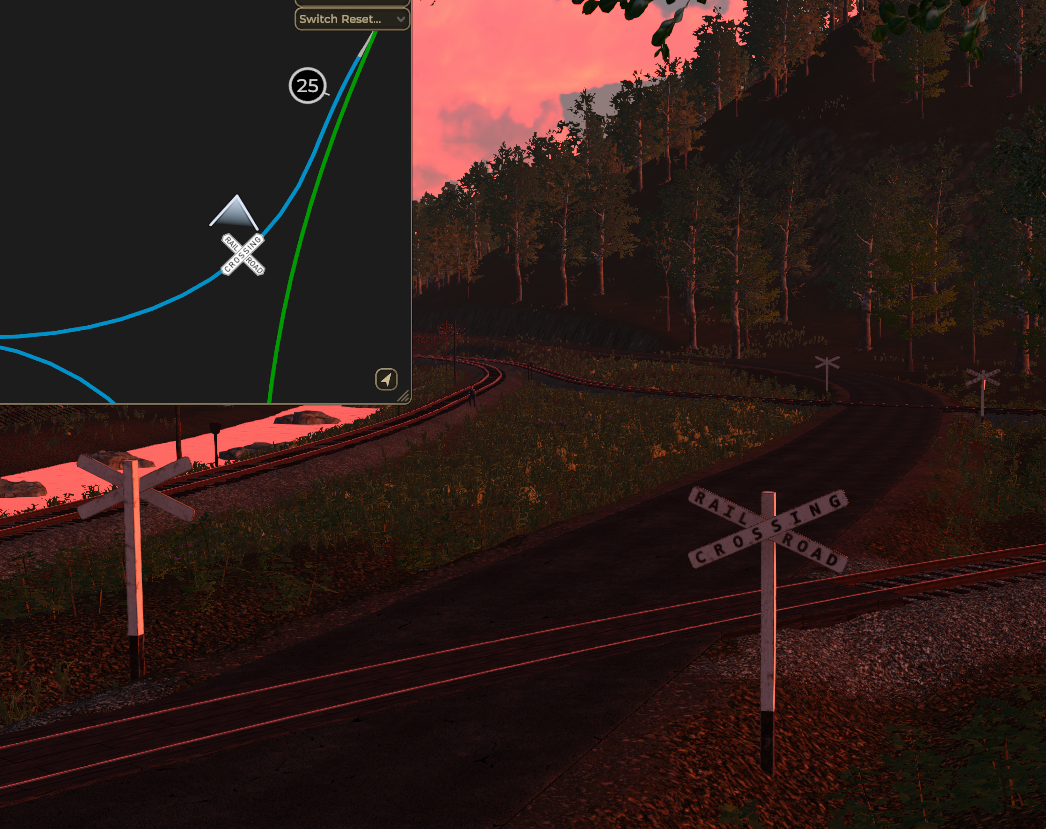
- 🛣️ Added: Road crossing markers on the map (uses
level-crossing.png) - 🧭 Added: Clustering for nearby crossing points to avoid duplicate icons at multi-track crossings
- ⚙️ Added:
Show Road Crossing Markerstoggle in settings - 🔎 Added:
CrossingMarkerScaleslider (default: 0.3)
- 🚂 Added:
Check Turntable Clearance/Fouling Before Rotationtoggle - ✅ Default: Enabled, but can be disabled if the automatic fouling check is too strict
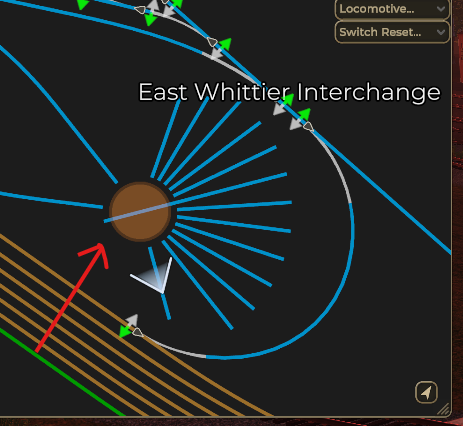
- 🎯 Smooth rotation of the turntable using the Map controls
- 🛜 Multiplayer sync for host and client
- 🚂 When the table fouled, the rotation is blocked
- 📄 Enhanced Switch Reset Logging
- 🎮 Three rotation modes: Ctrl+Click (clockwise), Alt+Click (counterclockwise), Shift+Click (180°)
- 🎯 Control turntables directly from the map with visual markers
- 🎮 Three rotation modes: Ctrl+Click (clockwise), Alt+Click (counterclockwise), Shift+Click (180°)
- ⚙️ Toggle visibility in settings (controls still work without markers visible)
- 🔍 Consistent marker sizing at all zoom levels
- 🎯 Auto-detects valid connected tracks only
- 📍 Large clickable area for easy interaction
- 🗺️ Load custom teleport locations from mods via
spawn-points.jsonfiles - 🔐 Whitelist system for approved mods
- 🎯 Modded locations appear under "---- Other ----" separator
- 🔄 Toggle control: "Additional Locations from Mods" setting (disabled by default)
- 📥 AR Branch template included with 9 spawn points
- 🎨 Fixed freight car icon colors for modded map areas (AR Branch, etc.)
- 🛠️ Robust parsing handles scientific notation and locale differences
- 🔧 Fixed: AR Branchline mod compatibility issues
- 🔧 Fixed: Mod conflict with Zamu.ForYourConvenience (FYC)
- ✅ Fixed: Junction switches not showing on map when both mods are active
- ✅ Fixed: Map UI settings menu not appearing with AR Branch and FYC
- 🛡️ Improved: Map extension initialization to prevent conflicts with other map mods
- 📝 Logs switch reset actions with player name tracking (Steam display name)
- 🔒 Anti-trolling: See who reset switches in multiplayer sessions
- ⏰ Triple logging: in-game console,
railloader.log, and a dedicated per-mod log file- Dedicated file:
Mods/MapEnhancer/MapEnhancer_SwitchResets.log(created automatically when the first reset is performed)
- Dedicated file:
- 🎨 Full control over unreachable/unavailable track color when industry area colors enabled
- 🎚️ Consistent RGBA slider UI for all color pickers
- 🔧 Fixed interchange tracks appearing dark gray with LegoTrainMan's Cross Traffic mod
- 🎨 Interchanges now correctly display yellow or proper area colors
- 🛡️ Skips Cross Traffic's global industry area to prevent color conflicts
- ✅ Full compatibility with Cross Traffic functionality maintained
- 🎨 Industrial tracks colored by their owning area's color (instead of uniform yellow)
- 🔧 Toggle control in mod settings (enabled by default)
- 🎯 Area registry lookup for accurate industry ownership detection
- ✅ Works correctly with both vanilla and modded industries
- 🌈 Light grey color for unreachable tracks (prevents confusion with red Sylva area)
- 🔄 Position-based fallback if registry lookup fails
- 🛡️ Inactive industry guard prevents disabled industries from affecting track colors
- 🚦 Real-time signal aspect visualization on map
- 🔴 Red: Stop
- 🟡 Yellow: Approach/Diverging Approach
- 🟢 Green: Clear/Diverging Clear
- 🟠 Orange: Restricting
- 👁️ Track colors are purely visual - doesn't modify underlying track classes
- 🔌 Prevents conflicts with other mods that depend on track classifications
- ⚙️ Toggle feature in settings (enabled by default)
- 🔄 Compatible with all existing MapEnhancer features
- 🟣 Highlight passenger stop track segments in purple
- 🔧 Toggle feature in settings (disabled by default)
- 🎨 Custom color picker for passenger stops
- 🔄 Reset ALL switches to Normal position (straight/mainline route)
- 🔄 Reset ALL switches to Thrown position (diverging route)
- 📍 Accessible via dropdown in map settings panel
- ⚡ Quick bulk operations for track management
- 📝 Logged actions with player identification (v1.5.4.1)
- ✅ Fixed race condition with track classification
- ✅ Resolved mainline/industrial tracks incorrectly classified as branch
- ✅ Track segments now properly classified after all mods initialize
- ✅ Industrial track coloring preserved correctly
- ✅ Improved compatibility with other map/track mods
- 🎯 Customizable junction markers with size controls
- 🔀 Visual indicators for switch positions (green=normal, red=thrown)
- 🎚️ Adjustable marker scale (0.5 - 1.0)
- 👁️ Auto-hide non-mainline markers at zoom threshold
- 🎨 Fully customizable track colors (mainline, branch, industrial, unavailable)
- 📏 Adjustable track line thickness (0.5 - 2.0)
- 🌈 RGBA color pickers for all track types
- 🎯 Track class-based automatic coloring
- 🚃 See ALL cars on the map, not just locomotives
- 📝 Car identification labels (reporting mark + road number)
- 🎨 Freight car color coding by destination area
- 📦 Visual representation scaled by car length
- 👆 Click to inspect car details
- 🔥 Visual flare indicators on the map
- 📍 Place flares directly from map view
- 🎚️ Adjustable flare marker scale (0.1 - 1.0)
- 🗑️ Click flares to remove them
- 🔍 Customizable min/max zoom levels (50 - 15000 range)
- 📐 Map window resizing (200 - 800 docked size)
- 🎮 Anti-aliasing options (Off, 2x, 4x, 8x)
- 🎯 Better zoom normalization and icon scaling
- 📍 Quick teleport dropdown to major locations
- 🎨 Color-coded locations by area
- 🗺️ Auto-sorted by area color (hue-based)
- ⚡ Instant camera repositioning
- 🚂 Dropdown list of all locomotives
- 📋 Sorted by locomotive name
- 👆 Click to center map on selected locomotive
- 🔄 Auto-updates as locomotives are added/removed
Z- Toggle map size (docked/fullscreen)Ctrl+Z- Toggle follow mode (keeps map focused on selected locomotive)Shift+Z- Re-center map on current camera positionLeft Click- Place flare (when flare tool is active)Double Click- Optional: Require double-click for interactions
- 🖱️ Drag to pan the map
- 🔍 Scroll to zoom in/out
- 👆 Click icons to interact (inspect cars, remove flares, etc.)
- 🎯 Click locomotives/cars to inspect and select
- 🟢 Mainline Tracks: Green (RGB [0, 155, 0], customisable)
- 🔵 Branch/Yard Tracks: Blue (Teal, customisable)
- 🟡 Industrial Tracks: Yellow (or area color when enabled)
- ⚪ Unavailable Tracks: Red (or light grey when industry area colors enabled, customisable)
- 🟣 Passenger Stops: Purple (when tracking enabled, customisable)
- 🎨 Full RGBA color pickers for all track types
- 💾 Colors persist between sessions
- 🔄 Reset to defaults available
Map Enhancer includes the original features below along with the community improvements listed above:
- 🧠 Train & Cargo Intelligence - Aggregated consist stats, fuel tracker, and freight/destination summary (v1.5.5)
- 🚃 Individual Car Tooltips - Car identifiers, waybill delivery status, cargo loads, journal oil health tracker and predictive alerts (v1.5.5)
- 🎨 Dynamic tooltip track colors - Matches segment/industry colors inside hover grade tooltip (v1.5.5)
- 📏 Grade indicators - Hover details, map markers, and overlay coloring for track grades (v1.5.4.5)
- 🚂 Turntable clearance toggle - Optionally bypass fouling checks when manual rotation should still work (v1.5.4.4)
- 🗺️ Modded spawn points support - Load custom teleport locations from mods (v1.5.4.2)
- 🎨 Fixed car icon colors - Freight car delivery status works on modded maps (v1.5.4.2)
- 🎯 Turntable control from map - Control turntables with Ctrl/Alt/Shift+Click (v1.5.4.2)
- 🔧 AR Branch & FYC compatibility - Fixed switches and map UI issues (v1.5.4.1)
- 📝 Switch reset logging - Track who resets switches in multiplayer (v1.5.4.1)
- 🎨 Customizable unreachable track color - Full control over unavailable track appearance (v1.5.4.1)
- 🔧 Cross Traffic mod compatibility - No more gray interchanges (v1.5.4)
- 🎨 Industry area colors - Tracks colored by owning area (v1.5.3.7)
- 🚦 Signal status display - Real-time signal aspects on map (v1.5.3.6)
- 🟣 Passenger stop tracking - Optional purple highlighting (v1.5.3.6)
- 👁️ Visual-only track colors - No conflicts with other mods (v1.5.3.6)
- 🔄 Bulk switch reset tools - Reset all switches at once (v1.5.3.6)
- ✅ Critical bug fixes - Track classification race conditions resolved (v1.5.2)
See detailed feature descriptions below and full changelog in Version History.
All settings are available and shown when game first launches.
- Fusee (Flare) Marker Scale: 0.1 - 1.0 (default: 0.6)
- Junction Marker Scale: 0.5 - 1.0 (default: 0.6)
- Junction Non-Mainline Marker Cutoff: 0.01 - 1.0 (default: 0.12)
- Controls when non-mainline junction markers hide based on zoom level
- Track Line Thickness: 0.5 - 2.0 (default: 1.25)
- Map Window Antialiasing: Off, 2x, 4x, 8x (default: 4x)
- Docked Map Window Size: 200 - 800 (default: 800)
- Map Zoom Min: 50 - 100 (default: 50)
- Lower values = more zoom in capability
- Map Zoom Max: 5000 - 15000 (default: 10000)
- Higher values = more zoom out capability
- Require Double Click: Toggle for double-click requirement on map interactions
- Show Turntable Markers: Toggle visibility of turntable markers (default: ON)
- Check Turntable Clearance/Fouling Before Rotation: Block turntable rotation when fouled (default: ON)
- Toggle Map Size: Default
Z(customizable) - Follow Mode: Default
Ctrl+Z(customizable) - Re-center Map: Default
Shift+Z(customizable)
Customize colors for all track types with RGBA sliders:
- Mainline Track Color
- Branch/Yard Track Color
- Industry Track Color
- Unavailable Track Color
- Passenger Stop Track Color (when enabled)
- Unreachable Track Color (when industry area colors enabled)
- ☑️ Use Visual-Only Track Coloring (default: ON)
- ☐ Enable Passenger Stop Tracking (default: OFF)
- ☑️ Enable Industry Area Colors (default: ON)
- ☑️ Show Train Hover Details: Toggle showing the detailed info panel on hover (default: ON)
- ☑️ Show Driver Name (default: ON)
- ☑️ Show Train Stats: speed, weight, cars, length (default: ON)
- ☑️ Show Locomotive Fuel Levels (default: ON)
- ☑️ Show Cargo Summary: cargo weight and types (default: ON)
- ☑️ Show Destination Summary: target destinations (default: ON)
- ☑️ Show Individual Freight Car Tooltip on Hover (default: ON)
- Compatibility may vary with other mods that modify the map or track classification.
All feedback, bug reports, and feature requests are welcomed!
- Discord Forum: Map Enhancer Discussion
- Railroader Official Discord: Join Discord
- RTM Discord: Join Discord
- Issues: Report bugs in the issue tracker
Contributions are welcome. Please open an issue or pull request with details about the proposed change.
-
✨ Fix debug logging spam in player.log
- Added a toggle in settings to enable debug logs
-
📋 Improved: Logging
- Reduced repetitive consist refresh log spam by deduplicating identical entries.
- Moved routine turntable status messages to debug-only logging.
-
🗺️ Added: Advanced Map Window Controls toggle
- Added a new setting to show or hide optional controls in the in-game map window.
-
🎨 Improved: Map Window
- The map window now preserves its current size when advanced controls are shown or hidden.
- 🧠 Added: Train & Cargo Intelligence Layer
- Live train info panel on hover with driver name, speed, total tonnage, car count, and consist length.
- Aggregated fuel levels (diesel/water/coal percentage) for locomotives in consist.
- Consolidated consist cargo list (cargo types and weights) and destinations.
- 🚃 Added: Individual Freight Car Tooltips
- Hovering a freight car marker shows car identification, type, waybill status, cargo, and capacity details.
- Detailed journal oil level tracking (using
OiledAPI) and hand brake status. - Prioritized alerts list for predictive maintenance:
- 🛑 Hotbox Detected (active hotbox failure)
⚠️ Hotbox Risk (under 10% oil)⚠️ Critical Journal Oil (under 25% oil)⚠️ Low Journal Oil (under 50% oil)⚠️ Hand Brake Applied
- 🎨 Improved: Dynamic Grade Tooltip Styling
- The grade hover tooltip now displays track type and name styled in the actual color assigned to that track type/industry area.
- 🐛 Fixed: Loose car caching so details for uncoupled cars on sidings update and display correctly.
- 📏 Added: Hover grade details for track segments with grade percentage and direction
- 🏷️ Added: Optional grade markers in the map window for segments above the configured intensity threshold
- 🎨 Added: Grade color overlay with configurable colors for flat, gentle, moderate, and steep grades
- 🧭 Improved: Grade markers are offset beside the track for easier reading
- 🎨 Improved: Grade marker text now uses the same grade-band color palette as the overlay
- 🛣️ Added: Road crossing markers on the map (uses
level-crossing.png) - 🧭 Added: Clustering for nearby crossing points to avoid duplicate icons at multi-track crossings
- ⚙️ Added:
Show Road Crossing Markerstoggle in settings - 🔎 Added:
CrossingMarkerScaleslider (default: 0.3) to control icon size - 🚂 Added:
Check Turntable Clearance/Fouling Before Rotationtoggle (default: ON) - 🧰 Fixed: Hardened PNG loader and prefab cleanup to prevent fallback placeholder icons
- 📦 Changed: Packaging updated to include only
level-crossing.pngfor crossing icons
- 🚀 Major: Improved multiplayer synchronization for turntable rotation
- Host-authoritative, property-change-based replication for reliable turntable control
- Peers observe and apply turntable rotation requests deterministically (reduces missed/queued clicks)
- Removed fragile sequence gating and timeout-dependent completion waits
- 📝 Added: Improved switch-reset audit handling and host-side logging (console + MapEnhancer_SwitchResets.log)
- 🔧 Fix: Turntable marker visibility and prefab tweaks (brown center circle now shows reliably)
- 🎨 Fix: Restored freight car destination color logic for modded areas
- 🛠️ Misc: Various multiplayer robustness and logging improvements
- 🎯 Added: Turntable control from map with Ctrl/Alt/Shift+Click rotation modes
- 🎨 Added: Turntable visual markers with customizable color and opacity
- 🗺️ Added: Modded spawn points loading system with JSON format support
- 🔐 Added:
EnableModdedSpawnPointssetting with whitelist system - 🎯 Added: "---- Other ----" separator in teleport dropdown for modded locations
- 📥 Added: AR Branch spawn-points.json template with 9 locations
- 🎨 Fixed: Car icon color darkening for modded areas with bright colors (hybrid HSV system)
- 🛠️ Fixed: Spawn point parsing to handle scientific notation and locale differences
- ✅ Fixed: Graceful error handling for malformed spawn-points.json entries
- 🌍 Improved: Culture-independent parsing with detailed error messages
- 🔧 Fixed: AR Branchline mod compatibility issues
- 🔧 Fixed: Mod conflict with Zamu.ForYourConvenience (FYC)
- ✅ Fixed: Junction switches not showing on map when both mods are active
- ✅ Fixed: Map UI settings menu not appearing with AR Branch and FYC
- 🛡️ Improved: Map extension initialization to prevent conflicts with other map mods
- 📝 Added: Switch reset logging with player name tracking
- Logging: in-game console, railloader.log
- Timestamped file logs with total switch count
- Anti-trolling feature for multiplayer sessions
- 🎨 Added: Customizable unreachable track color setting
- RGBA color picker for unreachable tracks when industry area colors enabled
- Replaces hardcoded light grey color with user preference
- Separate from standard unavailable track color
- 🎚️ Fixed: Passenger Stop and Unreachable Track color pickers now use consistent slider UI
- 🔧 Improved: Better visual customization options for all track color scenarios
- 🔧 Fixed: Interchange tracks appearing dark gray with LegoTrainMan's Cross Traffic mod
- 🛡️ Added: Check to skip Cross Traffic's "legos-global-industries" area identifier
- 🛡️ Added: Guard for inactive industry components
- ✅ Maintains full compatibility with Cross Traffic functionality
- ✨ Added: Industrial tracks colored by owning area's color (toggle in settings)
- 🎯 Added: Area registry lookup for accurate industry ownership detection
- 🎨 Changed: Unreachable tracks now light grey (prevents confusion with red Sylva area)
- ✅ Fixed: Modded industries showing incorrect colors
- ✨ Added: Position-based fallback detection
- 🚦 Added: Signal status display on map with color-coded aspects
- 🟣 Added: Passenger stop tracking with toggle (purple highlighting)
- 👁️ Added: Visual-only track coloring mode to prevent mod conflicts
- 🔄 Added: Bulk switch reset tools (All Normal / All Thrown)
- 🐛 Fixed: Track classification issues and branch/passenger track detection
- 🐛 Fixed: Race condition with track classification
- ✅ Fixed: Mainline/industrial tracks misclassified as branch
- 🔌 Improved: Compatibility with other map/track mods
See Releases for complete version history.
- Original Author: Vanguard - Original Nexus Mods Page
- Community Contributor: Reaper8f
- Contributors: Thanks to all community members who contributed fixes, testing, and documentation.
This project maintains the same license as the original Map Enhancer mod.
🎮 Happy Railroading!
Community improvements are included in the main repository with the original author's project history and credits preserved.