Repository navigation
[Bug]: Poor network connection causes command blocking #4835

Description

User story
as a server owner, i want command has a timeout, to keep running
Game
Don't Starve Together
Linux distro
Debian 12
Command
command: start, command: monitor, command: stop, command: restart
Further information
system info
linux: debian 13
using docker image: gameservermanagers/gameserver:dst
linuxgsm@gameserver:/app$ cat /build-time.txt
Sat Oct  4 03:31:44 AM UTC 2025
with poor network connection, and docker restart dstserver, after few mins, got a lot of commands
linuxgsm@gameserver:/app$ ps -ef
UID          PID    PPID  C STIME TTY          TIME CMD
root           1       0  0 10:40 ?        00:00:00 /bin/bash ./entrypoint.sh
root          13       1  0 10:40 ?        00:00:00 cron
linuxgsm      23       1  0 10:40 ?        00:00:00 /bin/bash /app/entrypoint-user.sh
linuxgsm     510       0  0 10:41 pts/0    00:00:00 bash
linuxgsm    1355       1  0 10:41 ?        00:00:00 /bin/bash /app/dstserver monitor
linuxgsm    2170       1  0 10:44 ?        00:00:00 /bin/bash /app/dstserver monitor
linuxgsm    3392    2170  0 10:49 ?        00:00:00 npm update
linuxgsm    3409       1  0 10:50 ?        00:00:00 /bin/bash /app/dstserver monitor
linuxgsm    3833       1  0 10:52 ?        00:00:00 /bin/bash /app/dstserver monitor
root        5458      13  0 11:00 ?        00:00:00 CRON
linuxgsm    5459    5458  0 11:00 ?        00:00:00 /bin/sh -c /app/dstserver update > /dev/null 2>&1
linuxgsm    5460    5459  0 11:00 ?        00:00:00 /bin/bash /app/dstserver update
linuxgsm    7696       1  0 11:02 ?        00:00:00 /bin/bash /app/dstserver monitor
linuxgsm    8110       1  0 11:04 ?        00:00:00 /bin/bash /app/dstserver monitor
linuxgsm    8974    3409  0 11:06 ?        00:00:00 npm update
linuxgsm    8991       1  0 11:06 ?        00:00:00 /bin/bash /app/dstserver monitor
linuxgsm    9387    8991  0 11:06 ?        00:00:00 npm update
linuxgsm   10290    8110  0 11:09 ?        00:00:00 npm update
linuxgsm   10307       1  0 11:10 ?        00:00:00 /bin/bash /app/dstserver monitor
linuxgsm   10720       1  0 11:12 ?        00:00:00 /bin/bash /app/dstserver monitor
linuxgsm   12675   10307  0 11:15 ?        00:00:00 npm update
linuxgsm   12692       1  0 11:16 ?        00:00:00 /bin/bash /app/dstserver monitor
linuxgsm   13587       1  0 11:18 ?        00:00:00 /bin/bash /app/dstserver monitor
linuxgsm   16043   12692  0 11:21 ?        00:00:00 npm update
linuxgsm   16060       1  0 11:22 ?        00:00:00 /bin/bash /app/dstserver monitor
linuxgsm   16456   13587  0 11:23 ?        00:00:00 npm update
linuxgsm   16941       1  0 11:24 ?        00:00:00 /bin/bash /app/dstserver monitor
linuxgsm   17337    1355  0 11:24 ?        00:00:00 npm update
linuxgsm   17354       1  0 11:26 ?        00:00:00 /bin/bash /app/dstserver monitor
linuxgsm   17750   17354  0 11:26 ?        00:00:00 npm update
linuxgsm   18428       0  0 11:27 pts/1    00:00:00 bash
linuxgsm   19453       1  0 11:28 ?        00:00:00 /bin/bash /app/dstserver monitor
linuxgsm   20942    7696  0 11:28 ?        00:00:00 npm update
linuxgsm   20953   16941  0 11:29 ?        00:00:00 npm update
linuxgsm   21497       1  0 11:31 ?        00:00:00 tmux -L dstserver-12fb60da new-session -d -x 80 -y 23 -s dstserver  ./dontstarve_dedicated_server_nullrenderer -persistent_storage_root
linuxgsm   21498   21497  0 11:31 pts/2    00:00:00 sh -c  ./dontstarve_dedicated_server_nullrenderer -persistent_storage_root /data/.klei -conf_dir DoNotStarveTogether -cluster Cluster_1
linuxgsm   21500   21498 12 11:31 pts/2    00:01:25 ./dontstarve_dedicated_server_nullrenderer -persistent_storage_root /data/.klei -conf_dir DoNotStarveTogether -cluster Cluster_1 -shard
linuxgsm   21880       1  0 11:32 ?        00:00:00 /bin/bash /app/dstserver monitor
linuxgsm   22278   19453  0 11:33 ?        00:00:00 npm update
linuxgsm   22289   10720  0 11:33 ?        00:00:00 npm update
linuxgsm   23621      23  0 11:34 ?        00:00:00 /bin/bash ./dstserver update
linuxgsm   24590   21497  0 11:34 ?        00:00:00 cat
linuxgsm   24619       1  0 11:34 ?        00:00:00 /bin/bash /app/dstserver monitor
linuxgsm   25850       1  0 11:36 ?        00:00:00 /bin/bash /app/dstserver monitor
linuxgsm   26300   25850  0 11:36 ?        00:00:00 npm update
linuxgsm   26324    5460  0 11:37 ?        00:00:00 npm update
linuxgsm   26335   21880  0 11:37 ?        00:00:00 npm update
linuxgsm   26352       1  0 11:38 ?        00:00:00 /bin/bash /app/dstserver monitor
linuxgsm   26748   26352  0 11:38 ?        00:00:00 npm update
linuxgsm   26759   23621  0 11:39 ?        00:00:00 npm update
linuxgsm   26770   24619  0 11:39 ?        00:00:00 npm update
linuxgsm   26781    3833  0 11:39 ?        00:00:00 npm update
linuxgsm   26798       1  0 11:40 ?        00:00:00 /bin/bash /app/dstserver monitor
linuxgsm   27195   26798  0 11:40 ?        00:00:00 npm update
linuxgsm   27347       1  0 11:42 ?        00:00:00 /bin/bash /app/dstserver monitor
linuxgsm   27741   27347  0 11:42 ?        00:00:00 curl -s -L -o package.json https://raw.githubusercontent.com/GameServerManagers/LinuxGSM/master/package.json
linuxgsm   28425   16060  0 11:43 ?        00:00:00 curl -s -L -o package.json https://raw.githubusercontent.com/GameServerManagers/LinuxGSM/master/package.json
linuxgsm   28427   18428  0 11:43 pts/1    00:00:00 ps -ef
I also found that network problems can also cause the start and stop commands to be blocked.
It seems that it will also curl something?
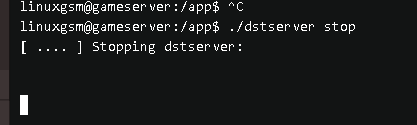
I hope these commands can be offline or non-blocking
Relevant log output
Steps to reproduce
No response
Metadata
Metadata
Assignees
Labels
Type
Projects
- Status
Activity
dgibbs64 commentedon Nov 1, 2026
The
npm updatethat was stuck in your process list is fixed by #5128. LinuxGSM's gamedig check now skips npm's audit request and gives up on a registry that does not answer after about 30 seconds instead of waiting for minutes, somonitorruns no longer pile up behind it. The container entrypoint got the same fix in GameServerManagers/docker-linuxgsm#113. This will be in the next release (v26.5.0). Thanks for the report.If commands still block on a poor connection after updating, please open a new issue with the output of
ps -efshowing which command is stuck.